
Enrollment Procedures
How to Enroll?
Basic Education (Integrated K-12 Department and Technical High School)
(Nursery, Kinder to Grade 12, Technical High School)
FOR NEW STUDENTS/ TRANSFEREES
Welcome to San Beda College Alabang! Once your child has been admitted, please follow the steps below to complete the enrollment process.
Step 1: Submit Enrollment Requirements
Registrar’s Office
Proceed to the Registrar’s Office and transact at the designated window.
Window 2- Grade 11 to 12 (STEM, AFA, HE, ICT)
Window 3- Grade 11 to 12 (ABM & HUMMS)
Window 4- Nursery to Grade 6
Window 5- Grade 7 to 10
Window 9- ID Inquiry
Please submit the following documents:
A. Academic Records
- Final Report Card with Learner Reference Number (LRN), Level of Promotion, school dry seal, and signature of the School Principal or Registrar
Additional notes:
- Nursery and Kinder applicants who did not attend any preparatory school are not required to submit a report card. However, a progress report or grades must be provided if the child previously attended a daycare, play school, or learning center.
- PEPT passers must submit a Certificate of Rating (COR) issued by the Bureau of Education Assessment (BEA).
- ALS or NFE A&E completers must submit an Accreditation and Equivalency (A&E) Certificate
B. Personal Documents
- Photocopy of PSA Birth Certificate
- One (1) 2×2 ID photo with red background
- Photocopy of Catholic Baptismal Certificate
- For non-Catholic applicants, please submit a duly accomplished Agreement for Non-Catholic Form(downloadable from the website)
C. Required Forms
- Data Privacy and Media Consent Form
- Must be signed by the student and parent/guardian
- Downloadable from the website or available at the Registrar’s Office
- Undertaking Not to Join Unrecognized Organizations
(For Grade 11 and Grade 12 students only)- Downloadable from the website or available at the Registrar’s Office
D. Appraisal Forms
(To be emailed to the SBCA Admissions Office)
Please carefully read the instructions indicated on each form.
- Behavioral Appraisal Form (for Nursery and Kinder applicants)
- Parents/guardians of Kinder applicants are requested to accomplish the form and email it to:
📧 [email protected]
- Parents/guardians of Kinder applicants are requested to accomplish the form and email it to:
- Student Academic and Discipline Appraisal (SADA) Form (for Grades 1 to 12)
- Kindly send the form to the applicant’s former teacher, guidance counselor, or school principal and request them to email the signed copy (digital signatures accepted) to:
📧 [email protected]
- Kindly send the form to the applicant’s former teacher, guidance counselor, or school principal and request them to email the signed copy (digital signatures accepted) to:
Download all required forms here:
https://sanbeda-alabang.edu.ph/admissions/downloadable-forms/
Step 2 : Complete the Student Information Form
Access the Student Portal:
https://sanbedacollege-alabang.orangeapps.ph/landing/enrollment/sbca/
Log in using the student number issued by the Registrar’s Office, then complete the Student Information Form.
Step 3: Pay Enrollment Fees
Cashier
Proceed to the Cashier to pay the required enrollment fees.
You may view and download the Schedule of Fees here:
https://sanbeda-alabang.edu.ph/admissions/schedule-of-fees/
Step 4: ID Picture Taking
Proceed to the designated area (Window 9) for your ID photo.
Important Notes
- San Beda College Alabang reserves the right to decline enrollment if admission requirements are not met.
- Applicants are responsible for the accuracy and authenticity of all submitted documents.
- Additional documents may be requested on a case-to-case basis.
Post-Enrollment Procedures
After enrollment, please complete the following:
| Service | Office | Location | Contact |
|---|---|---|---|
| Microsoft 365 Account & LMS Access | IT & Educational Technology | St. Bede Building | 8236-7222 loc. 2100 / 2170 |
| Medical Check-up | Clinic | St. Maur Building | 8236-7222 loc. 1650 |
| Purchase of Uniform | Bookstore | St. Benedict Building | 8236-7222 loc. 1960 |
| School Supplies | Bookstore | St. Benedict Building | 8236-7222 loc. 1960 |
| Admission Placement Assessment | Admissions & Testing Center | St. Benedict Building | 8236-7222 loc. 1080 / 1470 |
Contact Information
For inquiries or assistance, please contact:
📞 (02) 8236-7222 loc. 1090 Registrar’s Secretary
Nursery-Grade 6 (loc.4075) 📧 [email protected]
Grades 7-10 (loc.2350) 📧 [email protected]
SHS Grades 11-12 (loc.1093) 📧 [email protected]
Technical High School (Grades 9-12) (loc.4314) 📧 [email protected]
We look forward to officially welcoming you to the Bedan community!
Note: Enrollment will not be considered OFFICIAL unless required fees have been PAID AND VALIDATED by the Accounting Office within the period specified. ENROLLMENT VALIDATION FORM must also be secured at the Registrar’s Office and present it to the Class Adviser on the first day of school.
“That in all things God may be glorified”
How to Enroll?
FOR OLD STUDENTS:
Integrated K-12 Department and Technical High School
(Nursery, Kinder to Grade 12, Technical High School)
STEP 1: Log in to your Student Portal https://sanbedacollege-alabang.orangeapps.ph/landing/enrollment/sbca/
- Username: Student ID
- Password : YYY-MM-DD (your birthdate format)
STEP 2: Enrollment
- Click Enrollment
- Update profile and
- Select your payment plan
STEP 3: Payment
- Pay at the Cashier or
- ONLINE : https://sanbeda-alabang.edu.ph/payment-instructions/
For inquiries or assistance, please contact:
📞 (02) 8236-7222 loc. 1090 Registrar’s Secretary
Nursery-Grade 6 (loc.4075) 📧 [email protected]
Grades 7-10 (loc.2350) 📧 [email protected]
SHS Grades 11-12 (loc.1093) 📧 [email protected]
Technical High School (Grades 9-12) (loc.4314)📧 [email protected]
ID Inquiry (loc1095) 📧 [email protected]
Note: Enrollment will not be considered OFFICIAL unless required fees have been PAID AND VALIDATED by the Accounting Office within the period specified. ENROLLMENT VALIDATION FORM must also be secured at the Registrar’s Office and present it to the Class Adviser on the first day of school.
“That in all things, God may be glorified!”
How to Enroll?
Tertiary Education (College)
(SBAM, SET, and SASE)
FOR NEW STUDENTS/ TRANSFEREES:
Welcome to San Beda College Alabang! Once you have been admitted, please follow the steps below to complete your enrollment.
Step 1: Submit Enrollment Requirements
Registrar’s Office
Proceed to the Registrar’s Office and transact at the designated window.
Window 7- SBAM & BSP
Window 8- SET & SASE
Window 9- ID Inquiry
Please submit the following documents:
A. Academic Records
- For Freshmen:
- Final Grade 12 Report Card with Learner Reference Number (LRN), Level of Promotion, school dry seal, and signature of the School Principal or Registrar. (If report card is not yet available, kindly secure a Certificate of Completion.)
- For Transferees:
- Certificate of Eligibility to Transfer or Honorable Dismissal, Copy of Grades and Course/Subject descriptions.
- For Second Degree Applicants:
- Transcript of Records, Certificate of Eligibility to Transfer, Subject descriptions
B. Personal Documents
- PSA Birth Certificate (photocopy)
- One (1) 2×2 ID photo with red background
- Catholic Baptismal Certificate (photocopy)
- For non-Catholic applicants, please submit a duly accomplished Agreement/ Undertaking for Non-Catholic (downloadable from the website)
C. Required Forms
- Data Privacy and Media Consent Form
- Must be signed by the student and parent/guardian
- Downloadable from the website or available at the Registrar’s Office
- Undertaking Not to Join Unrecognized Organizations
- Downloadable from the website or available at the Registrar’s Office
D. Student Academic and Discipline Appraisal (SADA) Form
(To be emailed to the Admissions Office)
- Please read the instructions indicated on the form.
- Kindly request your former teacher, guidance counselor, or school principal to email the signed copy (digital signatures accepted) to:
📧 [email protected]
Download the SADA form and other required documents here:
https://sanbeda-alabang.edu.ph/admissions/downloadable-forms/
Step 2: Complete the Student Information Form
Access the Student Portal:
https://sanbedacollege-alabang.orangeapps.ph/landing/enrollment/sbca/
Log in using the student number issued by the Registrar’s Office, then complete the Student Information Form.
Step 3: Pay Enrollment Fees
Cashier
Proceed to the Cashier to settle the required enrollment fees.
You may view and download the Schedule of Fees here:
https://sanbeda-alabang.edu.ph/admissions/schedule-of-fees/
Step 4: ID Picture Taking
Proceed to the designated area (Window 9) for your ID photo.
Important Notes
- San Beda College Alabang reserves the right to decline enrollment if admission requirements are not met.
- Applicants are responsible for the authenticity and accuracy of all submitted documents.
- Additional documents may be requested on a case-to-case basis.
Post-Enrollment Procedures
After enrollment, please complete the following:
| Service | Office | Location | Contact |
|---|---|---|---|
| Microsoft 365 Account & LMS Access | IT & Educational Technology | St. Bede Building | 8236-7222 loc. 2100 / 2170 |
| Medical Check-up | Clinic | St. Maur Building | 8236-7222 loc. 1650 |
| Purchase of Uniform | Bookstore | St. Benedict Building | 8236-7222 loc. 1960 |
| School Supplies | Bookstore | St. Benedict Building | 8236-7222 loc. 1960 |
| Admission Placement Assessment | Admissions & Testing Center | St. Benedict Building | 8236-7222 loc. 1080 / 1470 |
Contact Information
For inquiries or assistance, please contact:
📞 (02) 8236-7222 loc. 1090 Registrar’s Secretary
SBAM & BSP (loc.1092) 📧 [email protected]
SET & SASE (loc.2050) 📧 [email protected]
ID Inquiry (loc1095) 📧 [email protected]
We look forward to welcoming you to the Bedan community!
Note: Enrollment will not be considered OFFICIAL unless required fees have been PAID within the period specified AND VALIDATED by the Accounting Office.
Only VALIDATED ENROLLEES will be included in the Official Class List and tagged with their courses/subjects in the OpenLMS. For OpenLMS concerns, kindly email [email protected].
STEP 1: Log in to your Student Portal https://sanbedacollege-alabang.orangeapps.ph/landing/enrollment/sbca/ portal or scan the QR code:
- Key in your credentials
- Acknowledge the Finance Policy Agreement.
- Adjust to SY 2026-2027 to view your enlisted subjects in First Semester.
(Ensure advising has been completed with your department chair) - Verify your Enrollment Assessment Form (EAF).
- Review and click your preferred mode of payment. Print it, and click ‘Submit
Enrollment.’
STEP 2: Pay at the Cashier for real-time payment validation.
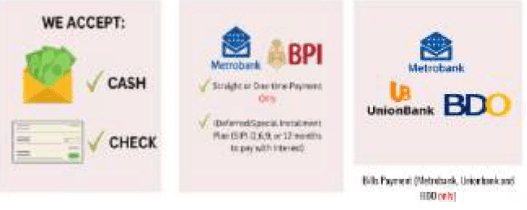
For more information, please visit the SBCA Finance
For online payment, please include a copy of your proof of payment in the PAYMENT LINK to ensure proper payment acknowledgement.
STEP 3: Proceed to the Registrar’s office and present the Official Receipt for the issuance of Certificate of Registration. COR can also be viewed and printable through Student Portal (click Student Accounts – EAF tab)
For inquiries or assistance, please contact:
📞 (02) 8236-7222 loc. 1090 Registrar’s Secretary
SBAM & BSP (loc.1092) 📧 [email protected]
SET & SASE (loc.2050) 📧 [email protected]
ID Inquiry (loc1095) 📧 [email protected]
Note: Enrollment will not be considered OFFICIAL unless required fees have been PAID within the period specified AND VALIDATED by the Accounting Office.
Only VALIDATED ENROLLEES will include in the Official Class List and tagged with their courses/subjects in the OpenLMS. For OpenLMS concerns, kindly email [email protected].
Note: Enrollment will not be considered OFFICIAL unless required fees have been PAID within the period specified AND VALIDATED by the Accounting Office.
How to Enroll?
School of Law (SOL)
For New Students and Transferees
Welcome to the School of Law of San Beda College Alabang.
The following procedures guide accepted applicants through the enrollment process. Please ensure that you have already completed the admissions requirements and received your admission approval prior to enrolling.
STEP 1 — Submit Enrollment Requirements
Submit the following documents to the Registrar’s Office for evaluation and enrollment assessment.
A. General Requirements
- Original PSA Birth Certificate
- Photocopy of Baptismal Certificate
(Non-Catholic applicants may accomplish the Agreement Form available on the Admissions page) - One (1) recent 2×2 ID picture (red background)
- Data Privacy and Media Consent Form duly signed
B. Additional Requirements (When Applicable)
- Marriage Certificate (for married applicants)
- Authenticated/Apostilled academic documents (for applicants from foreign schools)
- Photocopy of passport with latest visa stamp (foreign applicants only)
C. Scholastic and Professional Requirements
- Certificate of Eligibility to Transfer (Honorable Dismissal), if applicable
- Transcript of Records with remarks:
“Copy Valid for San Beda College Alabang School of Law” - Good Moral Certificate
- Certificate of Employment indicating working hours
📌 Important:
Transferees will undergo academic crediting and advising with the School of Law prior to final enrollment.
After document submission, a Pre-Registration / Enrollment Assessment Form will be issued by the Records Assistant.
STEP 2 — Payment and Validation of Fees
Proceed to the Cashier for payment and validation of enrollment fees.
👉 Online payment may be completed through the official Payment Portal.
STEP 3 — Issuance of Certificate of Registration
Return to the Registrar’s Office for the release of your Certificate of Registration once payment has been validated.
STEP 4 — Complete the Student Information Form
Log in to the iEnroll Portal using your assigned student number and accomplish the Student Information Form online.
STEP 5 — ID Picture Taking
Proceed to the designated ID picture-taking area.
Dress Code Requirement:
School of Law students must wear a collared shirt.
Post-Enrollment Procedures
After enrollment, please complete the following:
Service | Office | Location | Contact |
Microsoft 365 & LMS Access | IT & Educational Technology | St. Bede Building | 8236-7222 loc. 2100 / 2170 |
Medical Check-up | Clinic | St. Maur Building | 8236-7222 loc. 1650 |
School Supplies | Bookstore | St. Benedict Building | 8236-7222 loc. 1960 |
For inquiries or assistance, please contact:
Registrar’s office:
📞 (02) 8236-7222 loc. 1090 Registrar’s Secretary
School of Law (loc.2060) 📧 [email protected]
ID Inquiry (loc1095) 📧 [email protected]
Dean’s office:
📞 (02) 8236-7222 loc. 2390/ 2370/ 2380
We look forward to welcoming you to the Bedan community!
That in all things, God may be glorified.
STEP 1: Log in to your iEnroll portal or scan the QR code:

- Key in your credentials
- Acknowledge the Finance Policy Agreement.
- Adjust to SY 2025-2026 to view your enlisted subjects.
- Review and click your preferred mode of payment.
- Verify your Enrollment Assessment Form (EAF). Print it, and click ‘SubmitEnrollment.’
STEP 2: Pay at the Cashier for real-time payment validation.
For more information, please visit the SBCA Finance
For online payment, please include a copy of your proof of payment in the PAYMENT LINK to ensure proper payment acknowledgement.
STEP 3: Present your Official Receipt to the Registrar’s office for the releasing of Certificate of Registration. COR can also be viewed in the iEnroll portal through (Student Accounts – EAF tab)
For inquiries or assistance, please contact:
Registrar’s office:
📞 (02) 8236-7222 loc. 1090 Registrar’s Secretary
School of Law (loc.2060) 📧 [email protected]
ID Inquiry (loc1095) 📧 [email protected]
Dean’s office:
📞 (02) 8236-7222 loc. 2390/ 2370/ 2380
Note: Enrollment will not be considered OFFICIAL unless required fees have been PAID within the period specified AND VALIDATED by the Accounting Office.
Only VALIDATED ENROLLEES will be tagged with their courses/subjects in the OpenLMS. For OpenLMS concerns, kindly email [email protected].Only VALIDATED ENROLLEES will be tagged with their courses/subjects in the OpenLMS. For OpenLMS concerns, kindly email [email protected].
How to Enroll?
Graduate Education
For New Students and Transferees
Welcome to the Graduate School of San Beda College Alabang.
The procedures below guide accepted applicants through the enrollment process. Enrollment is completed after admission approval has been granted.
STEP 1 — Submit Enrollment Requirements
Submit the following documents to the Registrar’s Office.
A. General Requirements
- Photocopy of PSA Birth Certificate
- Photocopy of Baptismal Certificate
(Non-Catholic applicants may accomplish the Agreement Form available on the Admissions page) - One (1) recent 2×2 ID picture (red background)
- Data Privacy and Media Consent Form duly signed
B. Additional Requirements (When Applicable)
- Marriage Certificate (for married applicants)
- Authenticated/Apostilled academic documents (for applicants from foreign schools)
- Photocopy of passport with latest visa stamp (foreign applicants only)
C. Scholastic Requirements
- Certificate of Eligibility to Transfer (Honorable Dismissal), if applicable
- Transcript of Records with remarks:
“Copy Valid for San Beda College Alabang”
📌 Important:
Graduate School transferees may undergo academic advising and credit evaluation prior to enrollment.
After document submission, a Pre-Registration / Enrollment Assessment Form will be issued by the Records Assistant.
STEP 2 — Payment and Validation of Fees
Proceed to the Cashier for payment and validation of required fees.
👉 Online payment is available through the official Payment Portal.
STEP 3 — Issuance of Certificate of Registration
Return to the Registrar’s Office to receive your Certificate of Registration after payment validation.
STEP 4 — Complete the Student Information Form
Log in to the Student Portal using your assigned student number and complete the Student Information Form online.
https://sanbedacollege-alabang.orangeapps.ph/landing/enrollment/sbca/
STEP 5 — ID Picture Taking
Proceed to the designated ID picture-taking area.
Dress Code Requirement:
Graduate School students must wear a collared shirt.
Post-Enrollment Procedures
Service | Office | Location | Contact |
Microsoft 365 & LMS Access | IT & Educational Technology | St. Bede Building | 8236-7222 loc. 2100 / 2170 |
Medical Check-up | Clinic | St. Maur Building | 8236-7222 loc. 1650 |
School Supplies | Bookstore | St. Benedict Building | 8236-7222 loc. 1960 |
For inquiries or assistance, please contact:
📞 (02) 8236-7222 loc. 1090 Registrar’s Secretary
Graduate School (loc.2050) 📧 [email protected]
ID Inquiry (loc1095) 📧 [email protected]

We look forward to welcoming you to the Bedan community!
Note: Enrollment will not be considered OFFICIAL unless required fees have been PAID within the period specified AND VALIDATED by the Accounting Office.
STEP 1: Log in to your iEnroll portal or scan the QR code:
- Key in your credentials
- Acknowledge the Finance Policy Agreement.
- Adjust to SY 2026-2027 to view your enlisted subjects.
- Review and click your preferred mode of payment.
- Verify your Enrollment Assessment Form (EAF). Print it, and click ‘SubmitEnrollment.’
STEP 2: Pay at the Cashier for real-time payment validation.
For more information, please visit the SBCA Finance
For online payment, please include a copy of your proof of payment in the PAYMENT LINK to ensure proper payment acknowledgement.
STEP 3: Present your Official Receipt to the Registrar’s office for the releasing of Certificate of Registration. COR can also be viewed in the iEnroll portal through (Student Accounts – EAF tab)
For inquiries or assistance, please contact:
📞 (02) 8236-7222 loc. 1090 Registrar’s Secretary
Graduate School (loc.2050) 📧 [email protected]
ID Inquiry (loc1095) 📧 [email protected]
Note: Enrollment will not be considered OFFICIAL unless required fees have been PAID within the period specified AND VALIDATED by the Accounting Office.
Only VALIDATED ENROLLEES will be tagged with their courses/subjects in the OpenLMS. For OpenLMS concerns, kindly email [email protected].Only VALIDATED ENROLLEES will be tagged with their courses/subjects in the OpenLMS. For OpenLMS concerns, kindly email [email protected].
The Enrollment Assessment Form (EAF) contains the list and schedule of courses enrolled for the current academic year. It will be available for claiming on the specified date issued by the Office of the Vice Dean.
For IBED/Tech High, your EAF may be claimed at the Registrar’s Office.
Adding/dropping is also referred to as “adjustment” for late enrollment or revision of the previously selected courses/sections during enrollment.
For IBED/Tech High School, any request for adjustment in sectioning or shifting to a different strand must be coursed through the Principal/Vice Principal.
For undergraduate students at the College of Arts and Sciences, adding/dropping is facilitated by the Chairperson of each department. Transactions regarding regular or special adjustments are done on the specified schedule before the start of classes.

